to provide an abstract on the issue, this setup was working fine for a while but customer complined that last backup did not happen so I started my investigation for this issue.
client version:Oracle solaris 10 Sparc
Veeam VBR version: V11
Veeam plugin version :V4.0
Oracle client is part of a protection client which has multiple clients but only one client faced this issue.
I tried to manually initiate the backup from client side :#veeamconfig job list
and then start the job by any of below commands:#veeamconfig job start --name
#veeamconfig job start --id
the backup job started and finished successfully (in case it would not work, I would have created a new protection group, and register the client to new protection group using: #veeamconfig mode setvbrsettings --cfg <file_name>.xml --force )
Since the manual backup is working fine,I doubted that the issue could be due to schedule and crontab:
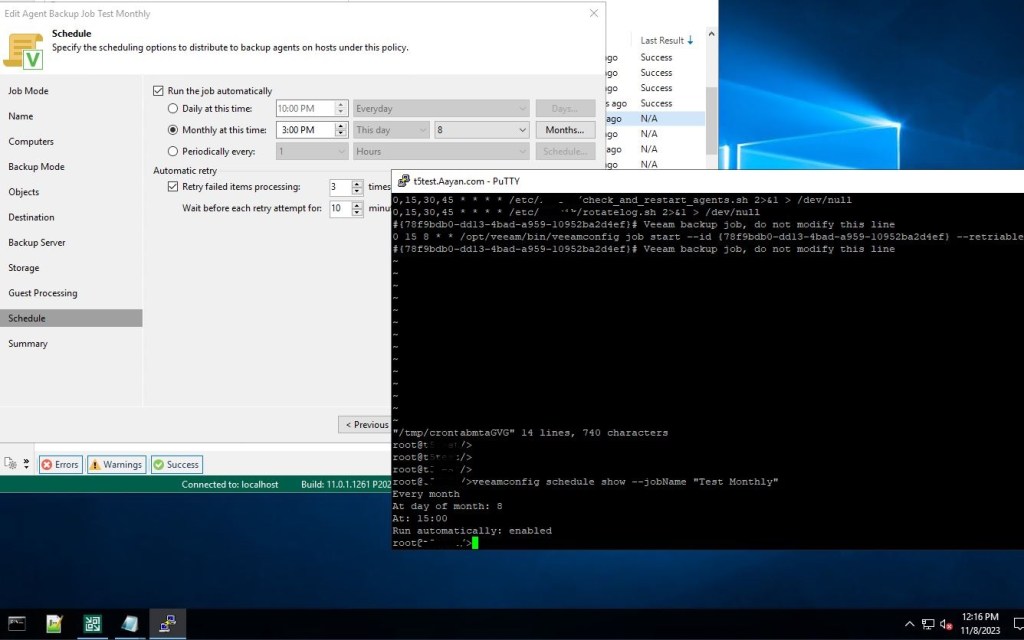
job time and schedule from client is matching as well.
date command on client shows that there is a time difference between client and VBR (almost 30 minutes)

After fixing the time difference on client and keeping a new schedule on job the backup run without any issue.
When I analyzed the log from VBR and Client, there was no error or warning related to backup window which was strange.
I hope such events can be triggered in Veeam as it makes troubleshooting much easier.
 tech journey