Veritas provides its appliances as a way to support customers who are looking for an all-in-one sort of backup solution. Netbackup appliance hardware and OS and software is handled and maintained by one vendor which is Veritas. The OS is hardened (Red Hat) to run Netbackup on top of it in the most efficient way possible.
On to this post, I like to talk about Call home option which by default is disabled on the Veritas appliances.
Architecture:
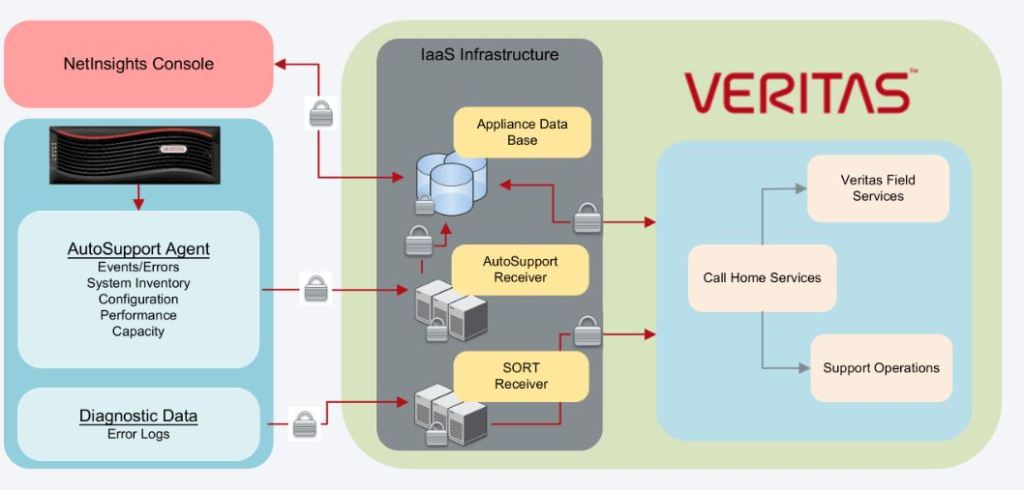
The AutoSupport client agent constantly monitors the appliance hardware and software components. It responds to critical events by collecting problem diagnostics data, system health data, and inventory data and transmitting it securely to Veritas via the Call Home infrastructure. Veritas Support then uses the data to diagnose or troubleshoot the issue. Based on severity of the issue, you will receive a call or email regarding any issue (or hardware malfunction) and then accordingly a case will be created and engineer assigned to it to troubleshoot the issue for you.so it is very Important to have this option enabled (unless you have a valid reason to ignore all benefits this option can bring to your business!).
Enabling Call Home provides a one-way communication that only transmits data and does not allow the appliance to receive any incoming data or notifications. All data that is transmitted to Veritas from an appliance is done with TLS-encrypted transmission by HTTPS PUT over port 443/tcp
Enabling Call Home
to enable call home ,for Netbackup appliance /flex, you can do it from both appliance GUI or from command line.
In this article I will explain how to do enable it for a Netbackup appliance.
In Netbackup appliance, the call home communication takes place over eth0 so first we need to confirm the eth0 is configured, and the interface is up.
To configure the Interface with our desired IP Address,in CLI>Network and then enter:
IPv4 <IP Address> <Subnet> interface

now that you have configured the IP on the interface, we need to assign a gateway to it too. From same location:
Gateway <IP of GW> <network IP> <Subnet> interface

Call Home uses HTTPS (secure and encrypted protocol) with port number 443 for all communication with the following Veritas Auto Support servers, so you need to provide the Internet access on your firewall.
api.appliance.veritas.com
receiver.appliance.veritas.com
sort.veritas.com
Now that we have prepared everything, let’s enable the call home:
in CLI go to settings> Alerts>enable call home
to confirm , you can if it call home is enabled, you can use
Settings>Alerts>show call home status
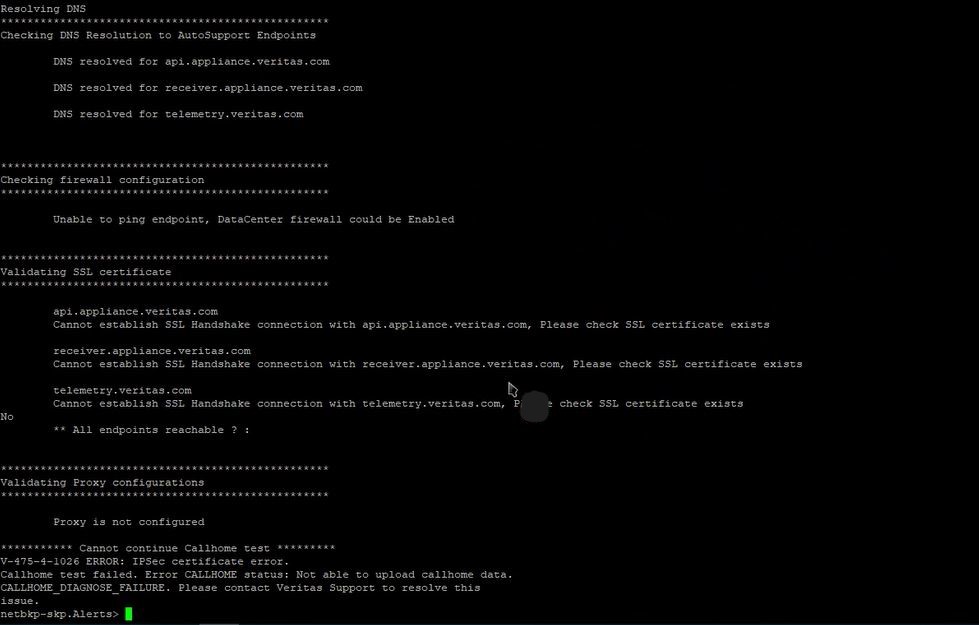
you can even do a call home test or diagnose the call home from same location. Below is the screenshot of call home diagnose command.(which in this case it failed!).
 tech journey