Logs are crucial and if you have a proper IT management and service in place you will have a SIEM (SYSLOG) server (or more) to centralize all logs in it. Obviously, logs can be helpful for teams to identify issues, detect threats, and remediate them faster.
In Nutanix, if you have Prism and Prism Central(PC) you have the option to enable the syslog for PC it will be from GUI and for AOS And AHV you need to do it from any CVM in the cluster.
Note:If Hypervisor is Hyper-V/VMware, you have to enable the log forwarding separately in their OS’s as well.
Requirement:
You need to know the syslog server IP address, name, port and protocol which will be used in the setup configuration
Prism Central:
You can enable and configure Syslog forwarding in GUI, which will forward(API Audit, Audit, Security Policy Hit logs, and Flow Service) Logs of registered clusters to syslog server:
– login to PC and go to Settings (or type it in search bar)
– under Alerts and notifications , click on Syslog server.
– add syslog server
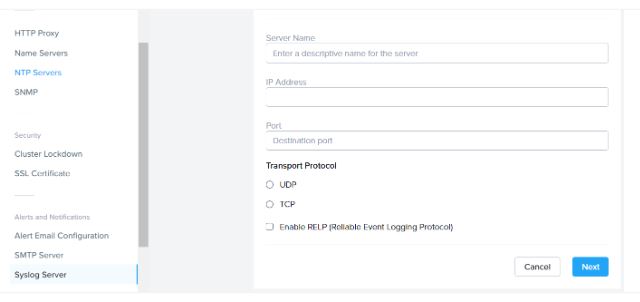
fill the IP and name and port and protocol type. You can enable RELP if required. And click on next
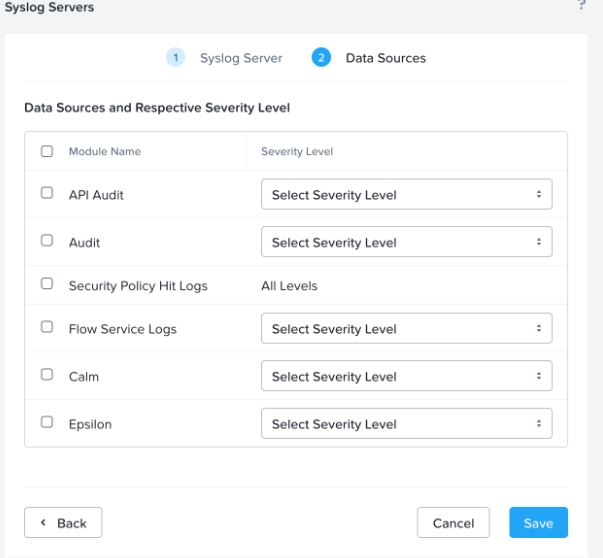
Select your data source(s) and the severity level for each one of them and save it.
You can find the severity level and their meaning in the bottom of this document.
AOS and AHV:
As I mentioned in the above ,we will need to do it via command line:
-login to any CMVs in the cluster via ssh and change to nCli
-first disable the syslog service, which is enabled by default:ncli>rsyslog-config set-status enable=false
-create a syslog server as below:ncli>rsyslog-config edit-server name=SYSlogsrv ip-address=IP_address port=514 network-protocol=udp relp-enabled=no

note: you can enable repl if the syslog server does supports it and the protocol needs to be TCP.
– we will add the module and the severity level ncli>rsyslog-config server-name=SYSlogsrv add-module module-name=syslog_module level=info

-last but not the least, enable the syslog server :ncli>rsyslog-config set-status enable=true
if you need to add more modules, you can do that with rsyslog-config add-module.
List of modules available:
- Acropolis
- Audit
- Cassandra
- Cerebro
- Curator
- Genesis
- Prism
- Stargate
- Syslog Module
- Zookeeper
- Uhura
- Lazan
- API Audit
- Calm
- Epsilon
- Minerva CVM
- Flow
- Flow Service Logs
- LCM
- Aplos
- Anduril
- Cluster Management
- Flow Hitlogs
list of loglevel (severity) available:
- DEBUG
- INFO
- NOTICE
- WARNING
- ERROR
- CRITICAL
- ALERT
- EMERGENCY
Cheers.
 tech journey