I was assigned a ticket to add an additional DC for one of our customers.
Domain controllers as a nature of their role in the network and domain, if there is a small issue it can impact all entities within that domain.
I started my task with running dcdiag on availble DC and I faced below error:

“Unable to connect to the NETLOGON share! an net user of LsaPolicy operation failed with error 67”
As error shows, and you might have guested, I used Net Share on primary DC and backup DC’s to find out if all DC shares are available:
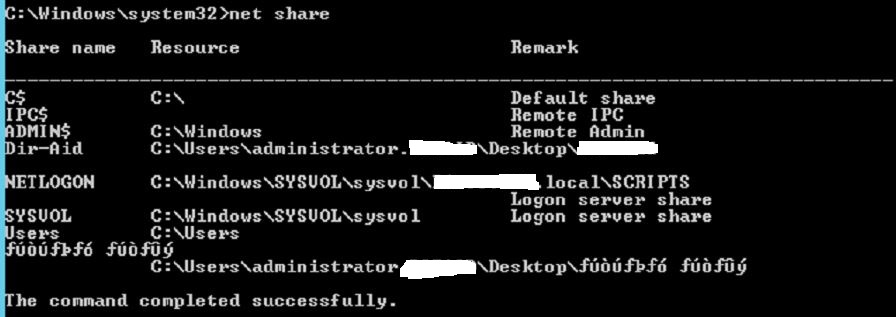
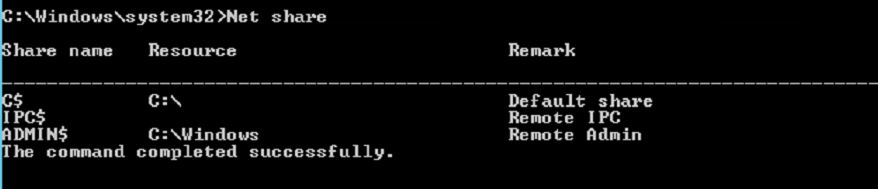
As you can see in above screenshots (which are from two different DC’s) , it is clear that Domain controller shares,NETLOGON & SYSVOL, are not available on second DC (down image).
I have checked on Internet and found out this website which explains how to use BurFlags registry key to reinitiate file replication service.
Please note that you should keep the non-authoritative or authoritative restore as your final solution and once you did , you need to monitor the DC replication to make sure the issue is sorted out (as we are not pinpointing the cause of the issue) or at least understand what is the source of the issue.
Authoritative restore of FRS:
-do below on all DC’s which are not primary (DC shares are missing from them)
Open elevate command prompt (run as Administrator)
-Net stop ntfrs
-open register and go HKEY_LOCAL_MACHINE\System\CurrentControlSet\Services\NtFrs\Parameters\Backup/Restore\Process at Startup
at right pane, open BurFlags and change the value to D2 and save it.
-repeat the above steps on Primary DC (which has the DC shares available ), but keep the registry value for burFlags to D4.
-Net start ntfrs on all DC’s to force the replication from D4 to other DCs(D2)
you can refer to event viewer to monitor the process and find out more about replication status.
Ahmad
 tech journey