Immutable storage
Nowadays with rise of Ransomware and other malicious threats, the backup solutions companies thought to improve the way they protect the backup data.one of very important part of a good backup strategy is to have an air gabbed or immutable storage so it can protect your copy of data.
A good benefit of having immutable storage, in case your production environment got compromised, as it names defines, it will prevent data deletion or modification and It can be helpful if the user accidentally deletes the data as it will not be allowed.
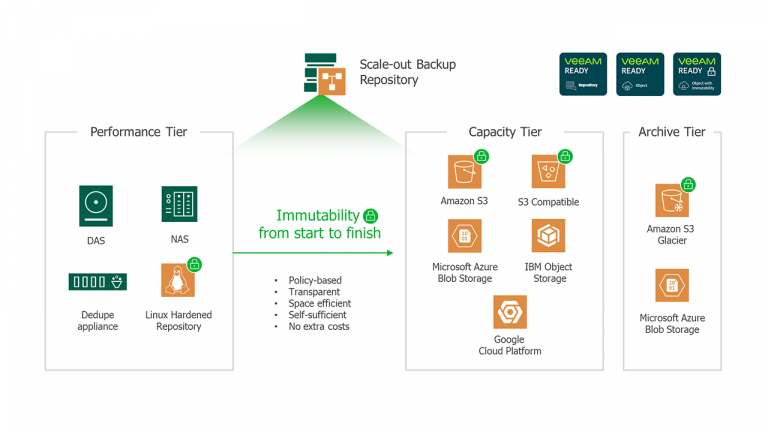
Veeam immutable storage
Veeam as one of the leaders in backup and protection, in version 10, introduced using a s3 compatible storage to store your data , most likely your secondary backup, with the help of object lock API.
Veeam in Version 11, introduced “new hardened Linux repository” to enable immutable storage primary backups (for short term retention) or secondary backup (for long term retention).
In production,What you will need:
• A physical server with DAS or SAN attached storage
• A linux distribution (64 bit ), recommended to support XFS file system and reflinks
• The linux distribution must support the chattr (command used to change attribute so files will be altered only by supper admin (or specific user)
• Veeam backup 11 or newer
• Veeam backup copy job must have GFS point configured
• Veeam backup job must be configured in forward incremental , with periodic synthetic or active full.
Creating the immutable repository
linux preparation:
-Linux , I used a 64 bit centos 7 , installed the latest updates on it, and added a second to disk, formatted it with XFS file system,
if you are creating the linux repository for your production,it is recommended to enable “fast clone”.fast clone will make the backup copy and synethic backup creation much faster.
you can use below command to format the disk which will hold backup with xfs file system and enable reflink and crc on the diskmkfs.xfs -b size=4096 -m reflink=1,crc=1 /dev/sdab
now since ,it is a lab and my linux is centos7, I was not able to enable reflink which later on in Veeam we will get a warning for it.
currently only CentOS 8.2 and 8.3, Debian 10.x, RHEL 8.2 or later, SLES 15 SP2, Ubuntu 18.04 LTS and 20.04 LTS do support reflink.
I changed the owner of the folderchown -R ahmad /backup
And changed the permission to provide access only to owner and rootchmod 700 /backup

Veeam preparation
Now that our backup repository is ready.let us connect to Veeam and add our new repository.
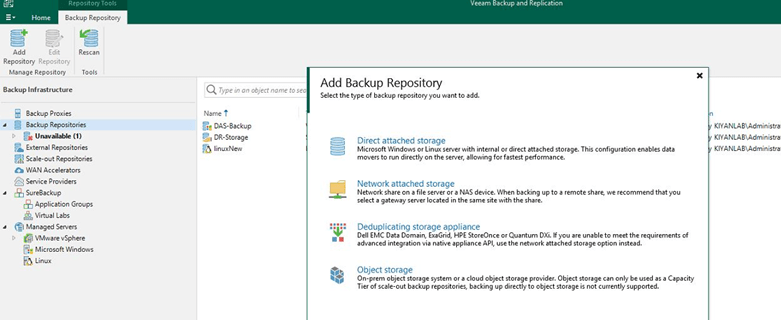
just go to backup repository > add backup repository>Direct attached storage>Linux
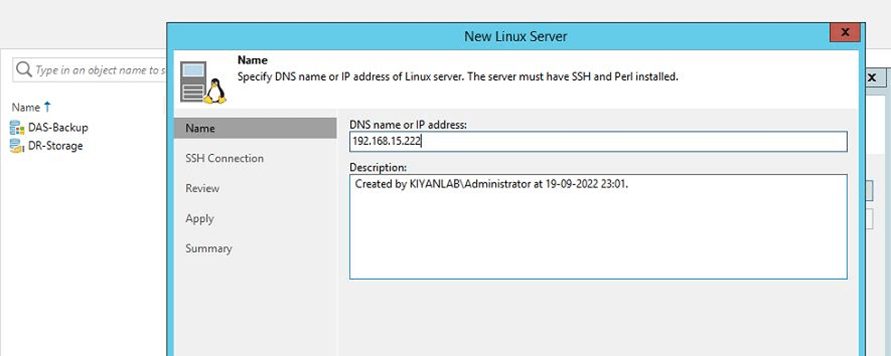
type the dns name or ip address of the linux server
We will use “single-user credentials for hardened repository” this way the credentils will not be stored and will be discarded once the veeam has a connection.
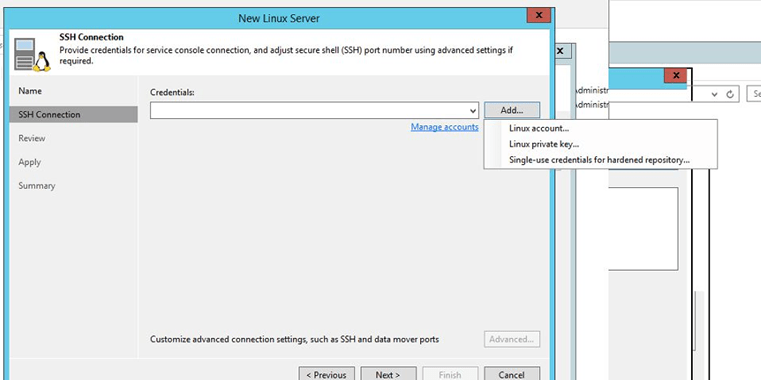
once you provide it the username , you can continue with the wizard and possibly accept the SSH fingerprint if you were asked.
once the connection is stablished, a new window will open which will show you all the repositories (mount point) availble on the linux server.
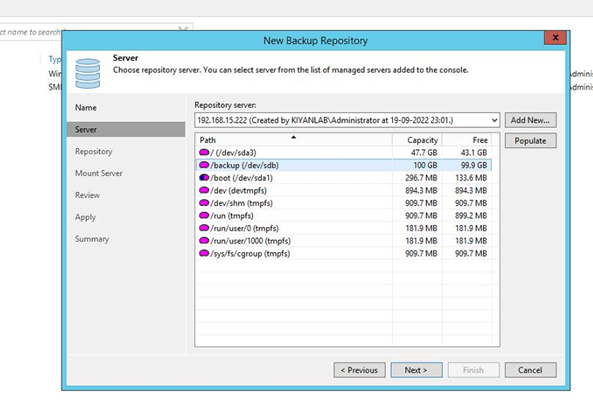
Select the right path (mount point) , I have selected /backup.

You can select fast clone , and make recent backup immutable (minimum 7 days).
you can change the load control and if you click on advanced it will give you

more options which are showing in above picuture.
As I have mentioned before, I have installed CentOS 7 , which does not support fast clone (reflinks cannot be enabled), I received below error.

I disabled the fast clone (as this is only a lab) and continued to end of the wizard, which you will be asked to define your mount server. and then review and at the end Veeam will take care of preparing the new repository.
Once you add the repository, you will need to create a new job and select the newly created repository as the backup repository.

Keep in mind that you have to enable GFS for the job and the minimum restore policy is 7 days.(our repository policy).go ahead and finish the job creation and run the backup job once.
now to test the immutable repository, try to delete the newly created backup job.

as you can see, We will not be able to delete the backup file due to immutable restriction.
Security tip:
As an administrator, you can go deeper in security and disable ssh on linux (as veeam does not need it) or eveng enable 2FA or MFA for your linux server.
 tech journey